COMC Store Credit has many uses on our site. You can use it anywhere on COMC to pay for the processing of consigned items, shipping items in your inventory, submitting cards for grading, and running promotions. Store Credit can be obtained either by selling cards on our site or by purchasing the store credit through third-party digital payment platforms with a credit or debit card.
To purchase COMC Store Credit, please follow these steps:
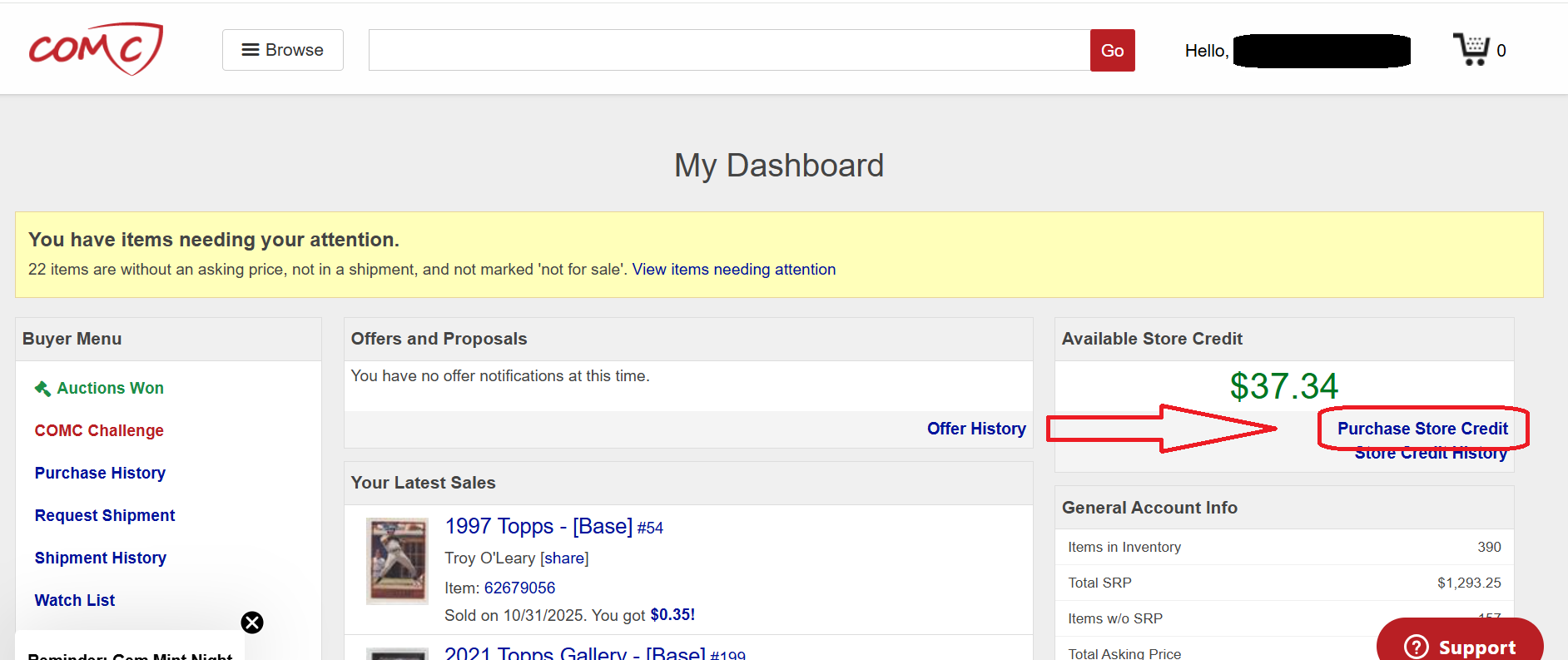
Ensure you are signed in to your COMC account. If you are just signing in now, you will be automatically moved to your COMC Dashboard. If you are not on this page, you can get there by clicking on your username on the upper right-hand side of the screen and choosing My Dashboard.
On the right side of the screen, you will see your Current Store Credit balance. Below that will be a blue link to Purchase Store Credit.
Select an amount or choose the Custom Amount option to buy credit in multiples of $10. Please ensure the Billing Info section of this page is filled out accurately and entirely with no blank sections. Then hit the red Proceed to Checkout button.
From this page, COMC store credit may be purchased with a Debit or Credit Card.
Please note that you can request a full refund of any unused store credit within the first 30 days of purchasing it by choosing the Request a Refund option from our cashout page. Learn more about request a Refund or Cash-out from our dedicated FAQ pages here.

Comments
0 comments
Article is closed for comments.